
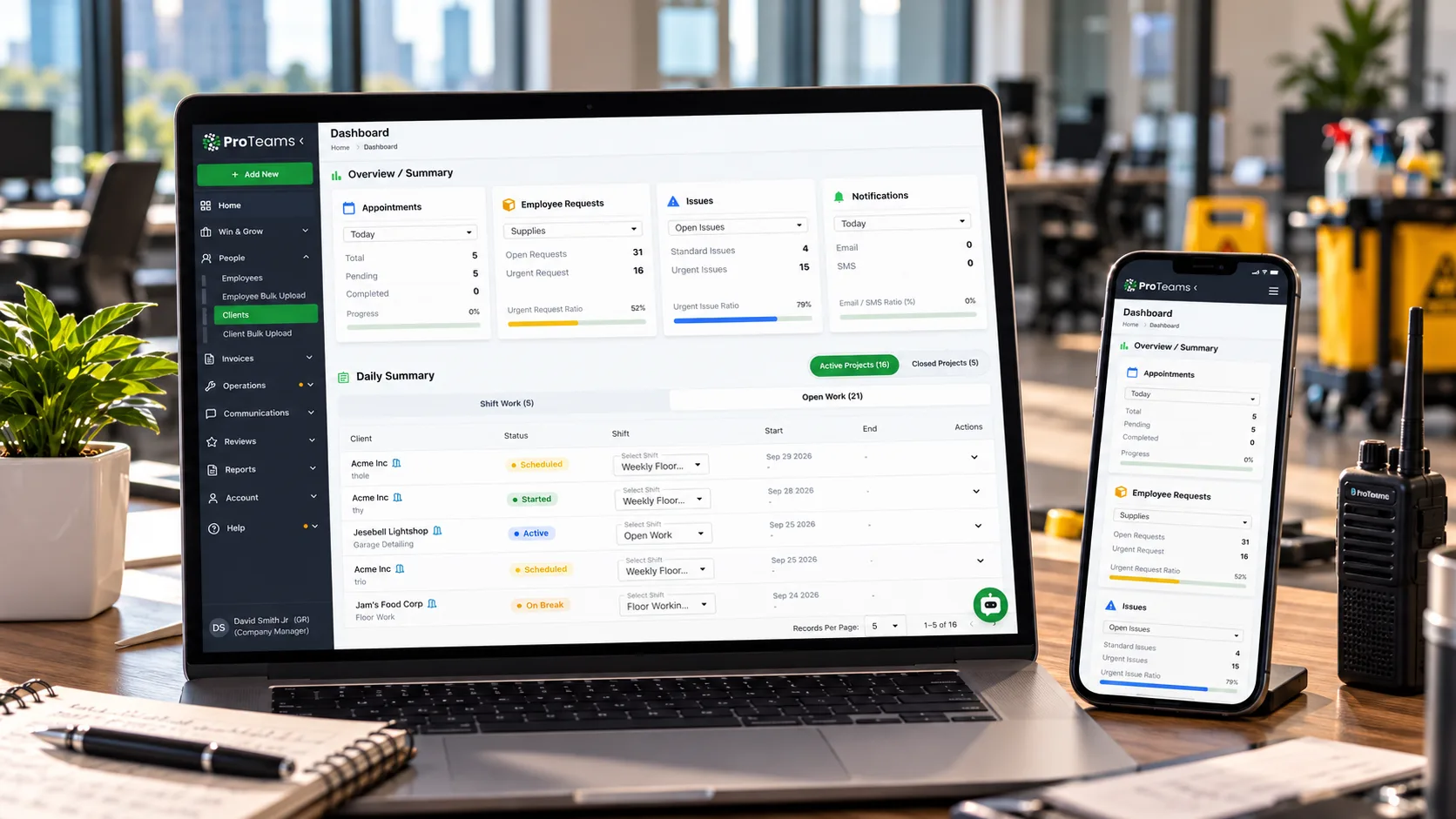
Cleaning scheduling software is a tool that assigns cleaning crews to sites and shifts, puts each cleaner's schedule on their phone, and shows the office in real time whether every shift started on time, ran late, or was missed. For a commercial cleaning company running more than a handful of buildings, it replaces the spreadsheet, the group chat, and the late-night phone calls with one schedule everyone works from. The useful kind is scheduling and dispatch software built around how cleaning actually runs: recurring night shifts, periodic floor work, and buildings nobody from the office will see until morning.
ProTeams was built inside ProCleanings in New York and Verdant in Texas, where for years the schedule lived in a spreadsheet and a group chat. The weak spot was always the same. The sheet said who'd be where. Nothing told the office who'd actually shown up. That's the gap this guide is about, and it's the first thing to check in any tool you're considering.
Good cleaning scheduling software answers one question at any hour: is every shift covered right now? Recurring schedules, check-ins, alerts, and reports all exist to answer it faster than your client can ask it.
What does cleaning scheduling software do?
Cleaning scheduling software does four jobs: it builds the schedule, delivers it to each cleaner's phone, records when each shift actually starts, and alerts you when one doesn't. A spreadsheet can handle the first job. It can't do the other three.
Here's what each job looks like in practice.
- Building the schedule. You create single and recurring shifts for every site, assign the cleaners, and attach the tasks for each visit. Changes (a cancellation, a reschedule, a swap) happen in one place.
- Delivering it. Each cleaner sees their own shifts and the task list for each one on a phone app, and gets a notification when something changes. Nobody has to scroll a group chat to find out where they're working tonight.
- Recording the start. The cleaner checks in at the building, and the check-in is timestamped. Better tools also confirm the location.
- Alerting on misses. When a shift's start time passes with no check-in, the office finds out while there's still time to fix it.
Commercial cleaning scheduling has a few habits other industries don't share. Most work happens after hours, in buildings with no manager on site. The same crew cleans the same building five nights a week for years. Periodic jobs like carpet extraction sit on top of the nightly routine. Generic shift-planning apps can hold the times. They usually don't know what to do with the tasks, the building, or the quarterly work.
Why do group chats and spreadsheets break past about five sites?
Group chats and spreadsheets break at around five sites because they record the plan, and nothing records what happened. Past that point, no single person can hold every shift in their head, and the gap between the schedule and reality is where clients find problems first.
The five-site line is a rule of thumb from the operators we work with, not an industry figure. With two or three buildings, the owner usually knows every cleaner by name, drives past the sites, and hears about problems by lunch. The spreadsheet works because the owner's the real system.
Add sites and the cracks show up in a predictable order:
- Swaps go private. Two cleaners trade a Tuesday by text. The sheet still shows the original name.
- The chat becomes the change log. Updates are buried under photos, questions, and "on my way" messages. Finding last week's schedule change means scrolling.
- The status call takes over the evening. Someone phones every site lead to ask whether the crew made it in. It works, slowly, and it stops working the night that person's sick.
- The client becomes the alert. A missed shift surfaces at 7:30 the next morning, when the tenant walks into a full trash can and calls the property manager.
That last one's what costs you accounts. Facility managers forgive a rough night far more easily than they forgive hearing about it from their tenants before they've heard it from you. If you're already past five buildings, this is the problem behind tracking teams across multiple buildings, and it's the main reason operators start looking at scheduling software for cleaning business use at all.
What are the four shift states every cleaning schedule should show?
Every cleaning schedule should show four shift states: scheduled, started, late, and no-show. If your schedule only shows the first one, you're learning about the other three from your clients.
A spreadsheet only knows "scheduled." Real cleaning crew scheduling needs to know where every shift sits right now, across every site, without a phone call. These are the four states worth tracking, and what each one asks of you.
| State | What it means | What moves a shift into it | What you do |
|---|---|---|---|
| Scheduled | The shift's assigned and on the cleaner's phone. | A supervisor creates or assigns it. | Nothing yet. The start time's still ahead. |
| Started | The cleaner's checked in at the building. | A timestamped check-in at or before the start time. | Nothing. This is the state you want every shift in. |
| Late | The start time's passed and the cleaner checked in after it, or hasn't checked in but is still inside your grace window. | The clock. | Contact the cleaner and confirm they're on the way. |
| No-show | The grace window's passed with no check-in. | The missed window. | Start covering the shift now. |
Set the grace window before you need it. Fifteen minutes is common for night shifts in our experience. What matters is that everyone, including the cleaner, knows where "late" ends and "no-show" begins. You'll find live versions of these states on the real-time shift status screen in most tools built for this work.
How much does an unnoticed no-show cost?
Use this formula: minutes a no-show goes unnoticed × hourly contract value = revenue at risk per incident. Hourly contract value is the monthly contract price divided by the service hours you deliver each month.
Here's a worked example with illustrative numbers. Say you're running 8 crews across 4 office buildings, five nights a week. One building pays $5,200 a month for four hours a night. Five nights a week is about 86.7 service hours a month, which makes each hour of service worth $60, or $1 a minute.
| When the no-show is noticed | Minutes unnoticed | Revenue at risk | What's still recoverable |
|---|---|---|---|
| Next morning, when the client calls | 240 (the whole visit) | $240 | Nothing. The visit's already missed, and the client knows first. |
| Midway, on a supervisor's status call | 120 | $120 | Half the visit, if a cover can get there fast. |
| At the end of a 15-minute grace window, by alert | 15 | $15 | Most of the visit, and the client may never notice. |
$240 doesn't sound like much. But the revenue at risk is the smallest cost in the row. The bigger one's the call itself. A property manager who finds out first starts keeping a list, and the list comes out at renewal. Run the formula against your own largest contract. You'll see why the first row matters.
How should you schedule daily, weekly, and periodic cleaning?
Schedule recurring cleaning in three layers: the nightly or daily shift, weekly tasks attached to specific nights, and periodic work like strip and wax or deep cleans scheduled as separate jobs. Folding all three into one recurring shift is how quarterly work gets forgotten.
Layer one: the recurring shift. This one's the backbone. Same building, same time, same crew, repeating until the contract changes. Set it once and let it repeat. Every exception (a holiday closure, a tenant event) gets edited on that date, so the pattern stays clean.
Layer two: weekly tasks. Some work doesn't happen every night. Dusting high surfaces on Mondays, detailing break room appliances on Thursdays. Attach those tasks to the specific night's shift so they appear on that night's checklist and nowhere else. A cleaner who sees ten nightly tasks and one weekly task knows exactly what's different tonight.
Layer three: periodic jobs. Strip and wax, carpet extraction, window washing, and post-construction cleanups need their own crew, their own equipment, and often their own night. They also tend to collide with the nightly crew if nobody plans around them. The commercial cleaning schedule guide shows how to lay out the weekly and quarterly tasks themselves. The playbook for scheduling labor-intensive floor care without conflicts covers the collision problem, and the post on automating quarterly strip and wax schedules covers the repeat-every-90-days part.
One-off jobs belong in the same system as the contracts. If a deep clean lives on a separate calendar, it'll eventually land on the same night as a regular shift with the same cleaner. Keeping both in one place is the point of managing one-off deep cleans alongside maintenance contracts. For how recurring schedules map onto contract terms and client expectations, see the guide to janitorial contract scheduling.
How do you schedule night shifts, day porters, and multiple buildings?
Night shifts, day porters, and multi-building portfolios all need the same thing from a schedule: proof that each shift started, visible from wherever you are. What changes is when you're watching and what tends to go wrong.
Night shifts. Nobody from the client is in the building, and usually nobody from your office is either. The check-in's the only signal you get until morning. That makes the alert window everything. If it fires at 10:15, you can recover. If you're waiting for a text that never comes, you can't. The guide to managing night shift cleaning crews without staying up all night goes deeper on running nights from a phone.
Day porters. Porters work while the building's occupied, so their schedule changes during the shift. A spill in the lobby, a conference room that needs a reset before 2 PM, a restroom complaint. The schedule sets their baseline. Communication handles the rest. Two posts cover this well: managing day porters across busy buildings and why day porter operations need real-time communication.
Hybrid offices. Occupancy now swings by day of the week in many offices, and the cleaning should follow it. Heavier service on busy days, lighter on quiet ones. That's a schedule decision, and it's covered in adjusting hybrid office cleaning to occupancy.
Multiple buildings. The more sites you're running, the more you need a single screen that shows every shift's state at once. Checking five apps or five group chats? That's the spreadsheet problem with extra steps.
How do you cover no-shows without scrambling?
Cover no-shows by catching them inside the first 15 minutes, confirming with the cleaner, and reassigning the shift from a short bench of people you've lined up in advance. The faster the alert, the more of the shift you can save.
Detection and recovery are two separate skills. Detection is knowing a shift was missed, and the post on no-show detection covers why it decides whether a client ever finds out. Recovery is what you do next: confirm, reassign, and decide whether to call the client before they notice. The full minute-by-minute playbook is in the guide to how to cover a no-show cleaning shift.
The bench is the part most operators skip. Before you need it, know who can cover each site: a floater, a cleaner who already works nearby on a lighter shift, or a supervisor who knows the building. Scheduling software won't build that list for you. What it does is shorten everything around it. No-show alerts tell you the shift was missed, the schedule shows who's working where tonight, and the reassignment lands on the new cleaner's phone with the building's task list attached.
What should you look for in janitorial scheduling software?
Look for six things in janitorial scheduling software: recurring schedules, GPS check-in, live shift status, no-show alerts, a mobile app for cleaners, and client-facing reports. A tool missing any of the first four can't tell you whether tonight's shifts are covered.
Take this list into every demo. The questions in the third column are the ones that separate a real answer from a sales answer.
| Must-have | Why it matters | Ask in the demo |
|---|---|---|
| 1. Recurring schedules | Contracts repeat for years. You should set a shift once, not rebuild it weekly. | "Can I schedule a quarterly strip and wax separately from the nightly shift?" |
| 2. GPS check-in | A timestamp says when someone tapped a button. Location says where they were. | "Is location-confirmed check-in included on every plan, or only some?" |
| 3. Live shift status | You need started, late, and no-show across all sites on one screen. | "Show me tonight's shifts for every site, with status, on one page." |
| 4. No-show alerts | An alert you get at 10:15 is worth more than a phone call you get at 7:30. | "When exactly does the alert fire, and who receives it?" |
| 5. Mobile app for cleaners | Cleaners need their shifts and each shift's tasks on their phone, on iOS and Android. | "What does a cleaner see when they open the app tonight?" |
| 6. Client-facing reports | Clients who can see the work get fewer surprises, and renew with fewer questions. | "Can clients receive reports automatically? On which plan?" |
Two practical notes. First, ask about plan tiers for items 2 and 6 directly; they're often the features that sit on higher plans. Second, be clear about what you're buying. Cleaning service scheduling software plans and verifies shifts. If you also need timesheets or payroll, budget for a separate tool or confirm the integration before you sign.
How does ProTeams handle cleaning crew scheduling?
ProTeams builds single and recurring shifts on one screen, sends them to cleaners' phones with each shift's task checklist, and shows the office which shifts started, ran late, or were missed as it happens.
Here's how that maps to the checklist above, with plan tiers where they apply.
- Recurring schedules. Supervisors create, cancel, and reschedule single and recurring shifts, with every appointment visible on one screen and a map view of the team. Periodic and one-off work can be scheduled as its own item.
- Check-ins. Cleaners check in from the app and every check-in is timestamped. Geofenced check-in, which confirms the cleaner is at the building, is on the Growth and Scale plans. Geo-tagging is on the Launch plan.
- Live status and alerts. Each shift shows as on time, late, or no-show in real time, and no-show alerts flag a missed shift to the office.
- Mobile app. Cleaners use the iOS or Android app to see their shifts and each shift's digital checklist. Schedule changes go out by push, email, and optional SMS.
- Proof of service. On every plan, cleaners can add photos, marked verified when taken on site.
- Client visibility. Clients can log in to a portal to view schedules and report issues. Auto-delivered client reports are on the Growth and Scale plans.
Two honest limits. ProTeams doesn't track which cleaners are free or fill open shifts on its own; your supervisor picks the cover, and the app delivers the change. And it doesn't run payroll or timesheets. What it does is tell you, at any hour, whether every shift is happening and who's been reliable over time.
Frequently Asked Questions
What is cleaning scheduling software?
Cleaning scheduling software is a tool that assigns cleaning crews to sites and shifts, delivers each cleaner's schedule and task list to their phone, records when each shift actually starts through check-ins, and alerts the office when a shift is late or missed. It replaces spreadsheets and group chats for commercial cleaning companies running multiple buildings.
How do you schedule cleaning crews across multiple sites?
Set each site up as a recurring shift with its own crew and task list, attach weekly tasks to specific nights, and schedule periodic work like floor care as separate jobs. Then track every shift's status (scheduled, started, late, no-show) on one screen, with alerts when a shift has no check-in by the end of your grace window.
What should janitorial scheduling software include?
Six things: recurring schedules, GPS check-in, live shift status, no-show alerts, a mobile app for cleaners, and client-facing reports. Ask which plan each feature sits on, since location-confirmed check-in and automated client reports are often limited to higher tiers.
What's the difference between scheduling software and time tracking software?
Scheduling software plans shifts and verifies that they happen: who's assigned, whether they checked in, and whether the work got done. Time tracking software records hours worked so you can run payroll. Some products do both, and many cleaning companies use one tool for each.
Build a schedule you can check at 10 PM
The test for any schedule's simple. Open it at 10 PM on a Tuesday and ask whether every building has a cleaner in it. If the honest answer is "probably," you've got a plan and no way to check it. Pick a tool that turns that "probably" into a screen you can read, and the 7:30 AM calls get rare. To see how ProTeams handles your sites, book a demo or start your free trial.